|
Categorize Them All
If you're including a Category file, you need to include the CategoryMessageFile (full path to the Category DLL) and the CategoryCount (the number of categories you included in the file). In this article's 1996 version, I added an entry to the Sources value programmatically under ..\EventLog\NameofLog. This value is a REG_MULTI_SZ, which contains multiple, null-delimited entries. However, Richard Grimes points out in his articles that adding this value yourself is not only unnecessary (NT adds it automatically), but doing so can cause hard-to-diagnose problems (see Resources). I can confirm the quirky behavior. The moral is, don't touch this value yourselflet NT handle it. Curiously, NT appears to sort these entries in reverse alphabetical order.
The WriteEvents2 component (ActiveX DLL) contains three public classes: cVersion, cRegisterEventSource, and cWriteEventLog. cVersion returns the version of the operating system installed (you need to address some variations between NT versions). The cRegisterEventSource registers the message and category files described earlier. In this article's code project, the category file's registration is optionalyou must send a nonblank value for xi_strCategoryFile parameter to register the category.
The cWriteEventLog class contains a method to write an entry to the selected event log on the selected machine, and properties to set the event category, event ID, and binary data for that event. The class also contains a method (LogNames) to return all the available event log names. In NT 4.0, it returns only the standard Application, System, and Security names. But on Windows 2000 or later, if you have a domain server, you'll have some additional logs, such as Directory Service, DNS Server, and File Replication Service. Actually, you can create your own event logs in NT 4.0 or Windows 2000, but this is poorly documented. In any case, the LogNames function returns any added logs.
You can get this information by enumerating the keys (not the values) under HKLM\ System\CurrentControlSet\Services\EventLog. The majority of the code this function uses is in a friend function in cRegisterEventSource (GetLogNames). All the other Registry functions and declares are in the cRegisterEventSource class, so I didn't want to duplicate them in the cWriteEventLog class, but calling the functions and declares from cWriteEventLog makes more sense.
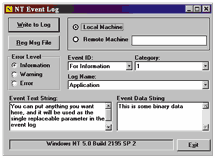
The TestWrite project is a test frame to exercise the WriteEvents2.dll (see Figure 3). Notice you can write to either the local or remote event log (assuming you have rights to do so on the remote machine). However, this ability is somewhat misleading, because I don't include a way to register (or even copy) the message resource DLL to the remote machine. Currently, to avoid getting the "The description for event ID ( #### ) …" message in the remote log, you need to run TestWrite on the remote machine to register those DLLs. The Log Name combo box is filled with the LogNames() method. The label on the bottom showing the operating system version isn't necessary, but I included it to remind myself which version of NT I was testing on.
|




 Take Control of the Event Log
 Introduction
 Take Control of the Event Log
 Write an Entry Successfully