|
|
 |

|
||||||
|
||||||
|
| Close Window |
Free Trial Issue of Visual Studio Magazine
|
|
||||||||||||||
|
Upsize Crosstabs Conventional Jet crosstab queries offer only row totals and execute each time a user opens a form, control, or graph that's bound to the query resultset. Depending on the complexity of the SELECT statement and the number of records in the underlying tables, executing a crosstab query can cause a serious performance hit on the server. In most cases, you don't need to update the table more than once per hour, shift, or day. (Crosstabs based on historical data need updating only when auditors or the U.S. Securities and Exchange Commission require retroactiveand usually downwardrestatements of sales and earnings.) You also can apply a sort order on aggregated values in tables to display rows with the highest value first, for instance. Jet crosstabs can't handle ORDER BY clauses on aggregate columns. Jet crosstab queries consist of these elements in this order:
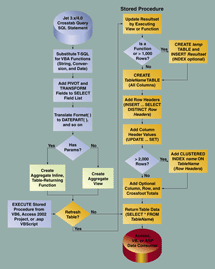
Migrating crosstab queries to SQL Server is a two-step process, which generates either a view or an inline, table-returning function, and a stored procedure to create and return rows from a table (see Figure 1). Unfortunately, you can't create a view or inline function within a T-SQL stored procedure; if you could, the Resource Kit's "stored procedure" recommendation would be correct.
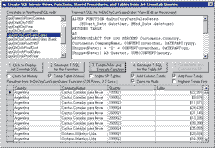
The first step in the process: Create the view with a SELECT TOP 100 PERCENT statement that adds the PIVOT expression for the aggregate and the TRANSFORM expression to the original SELECT field list. Add the Jet GROUP BY clause and an identical ORDER BY clause (see Listing 1). You need the ORDER BY clause to sort the row headings alphabetically and, in some cases, numerically. You need a SQL Server 2000 function instead of a view to handle parameterized crosstabs. The resultset consists of a column for each row header, plus two columns to hold the column header names and aggregate values (see Figure 2). You can also use the intermediate view or function as the data source for PivotTables and PivotCharts. It gets tricky when TRANSFORM or SELECT statements include one or more Format functions with embedded or external literals. For example:
both translate to:
in the view or function's T-SQL statement. The Crosstab Wizard's use of non-Y2K-conforming Format(ShippedDate, "MMM 'YY") for row header values in the SELECT and GROUP BY clauses worsens the situation. The T-SQL replacement is:
Plus, you need to add this clause to the SELECT statement that returns the table rows:
The second and final step is writing the stored procedure to generate a crosstab table structure with field names, data types, and sizes derived from the view's columns and properties. Specify DEFAULT 0 if you want to add a Totals column and crossfoot total. Add the row headings with this statement: INSERT INTO crosstabtable SELECT DISTINCT row_headings FROM view-name. Create a temporary table from a parameterized function's resultset, replace view with temptablename, and add an index on the temporary table to speed execution of the SELECT DISTINCT statement. You won't see a significant improvement in performance from the index with fewer than 1,000 table records, but adding the index is quick. Parameterized queries create a different table for each parameter value or set of values. For example, the name of the table for a qryQtrCtryCustSalesDates crosstab with a date range of 1/1/1999 to 12/31/2000 is tbQtrCtryCustSalesDates_01011999_12312000. The table name depends on parameter value(s), so you must use EXEC with string instructions to handle a designated table name from a T-SQL variable value. Add the column heading values with this statement for each column heading:
If you add a Totals column, execute this code:
Column totals require this statement:
followed by this statement:
for each column header. For tables with both row and column totals, use this:
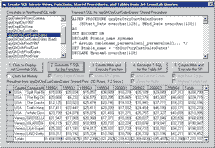
Finally, add a SELECT * FROM table statement at the end of the procedure to return the table Recordset to your front-end application (see Listing 2 and Figure 3). Writing and debugging such a T-SQL script (especially with EXEC statements) can consume the better part of a day. Test the stored procedure by comparing its recordset with the one returned by the Jet crosstab query. If you change the temporary or crosstab table's structure, be sure to drop the table(s) before running the ALTER PROC(EDURE) script. If either table exists and differs from the existing table structure, SQL Server 2000's dependency checker throws an error, and you can't alter or execute the procedure.
I encountered another gotcha when testing crosstab tables that contain several thousand records: Write-caching scrambles the physical order of the records near the end of the table. Using Windows 2000's device manager to turn off software write-caching for the drive doesn't solve the problem and can degrade performance. Instead, you add a clustered index on the crosstab table's row headings. In this case, you prefix the Totals value of the totals row with "zzzz" or the like to make it the last row in the sorted table. Replace zzzzTotals with Totals in the stored procedure's SELECT statement (see the end of Listing 2). The time required to create or alter and then execute the stored procedure matches the time required to execute the Jet crosstab query. If your source tables have a large number of records, users experience a significant hiatus each time their front-end application executes the Jet query or stored procedure. Delivering a recordset from the crosstab table directly usually takes less than a second. To control the crosstab's table refresh interval, add a shortcut: label on the line before the final SELECT statement. Then add this preamble (after the parameter declarations, if present) to jump to the shortcut: label:
Alter the DATEDIFF code and the comparison value to correspond to the "liveness" of the underlying data. If your crosstabs return monthly or quarterly data, add statements to update them on the first day of the month or quarter. Alternatively, schedule execution of a T-SQL script to update all crosstab tables at night. When you migrate from crosstabs to PivotTables, remove the crosstab table-creation code and deliver the view or function resultset from a periodically updated table. Replacing queries against large databases with result tables speeds the opening of PivotTables. Typing and testing the T-SQL for views and stored procedures manually is a tedious process at best. I wanted to determine what additional elements the view/stored procedure combination needed to upsize common types of production crosstab queries without spending several days writing T-SQL. I also was curious about gotchas that might account for the Access 2002's Upsizing Wizard's inability to accommodate crosstabs. Parsing complex Format functions and dealing with parameterized queries proved to be the most challenging elements. After writing a couple thousand lines of VB code for the Crosstab.vbp project, I've concluded that a wizard can automate the crosstab upsizing process. Only the most obscure Jet SQL crosstab syntax requires manual intervention to edit the T-SQL statement that the program generates for views and functions. You seldom, if ever, need to edit the stored procedure script. Crosstabs remain a viable, low-overhead alternative to PivotTables, SQL Server Analysis Services, and data cubes. The Access 2002 Upsizing Wizard's inability to handle Jet crosstab queries or any query containing a Format function is a serious deterrent to migrating from Jet MDBs to Access Data Projects and SQL Server 2000 databases. VB developers also need a migration path for code-created Jet crosstab queries. Until the SQL Server team implements PIVOT and TRANSFORM or their equivalents, Crosstab.vbp or a similar approach is your best bet for quick delivery of spreadsheet-like summary data to users. Roger Jennings, a principal of OakLeaf Systems, is a contributing editor for Visual Studio Magazine. His primary interests are client/server and XML/XSLT database applications, and Active Directory Service Interfaces (ADSI) programming. Roger's latest books include Special Edition Using Microsoft Access 2002 and Special Edition Using Windows 2000 Server (both Que). E-mail Roger at
|
||||||||||||||


 Introduction
 Introduction